


Transitions, like moving between activities, getting ready to go outside, or cleaning up, can be tough for young children. Visual timers are simple but powerful tools that help make these moments smoother for everyone.
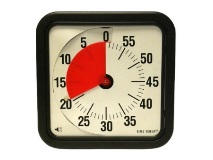
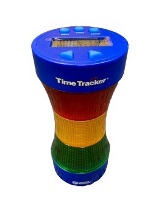
A visual timer shows time passing in a way kids can see and better understand before they learn numbers or reading clocks. Some use a shrinking red disk, others show a countdown with numbers or colors. Unlike regular clocks, visual timers show the passage of time in more concrete and predictable ways.
Visual timers support all children, but they’re especially helpful for kids with autism, developmental delays, or children who struggle with transitions or changes in routine.
They help children:
Children often struggle with abstract concepts like “5 more minutes.” A visual timer turns time into something they can see disappearing. This helps them adjust and shift gears more easily.
Learn more about visual timers and how to use them by watching our “Visual Timers” video!
Visual timers help children feel safe, prepared, and successful, especially during tricky transitions. Try one today and see how it transforms your classroom!
This resource is courtesy of University of Colorado’s Center for Innovative Design and Engineering’s project Adapt to Impact. Adapt to Impact provides ongoing professional development, resources, and access to a loan library of adaptive equipment, toys, and materials at no cost to licensed Colorado family childcare homes, centers, and preschools. For more information and more resources visit our website: Adapt to Impact.
© 2025 Center for Innovative Design and Engineering. This material may be shared and reproduced for non-commercial purposes with attribution. No prior permission is required. Please credit CIDE as the source.